AI-Ready Infrastructure: A CTO’s Readiness Checklist
The infrastructure request often arrives before the workload is well understood. A pilot performs well, interest grows and the next discussion turns to additional compute. Yet the evidence may still be missing: how many people will use the application, which data it can access and what happens when it becomes unavailable.
Those questions determine whether an infrastructure investment is justified. More capacity can address a measured constraint. It cannot resolve an unclear use case or an operating model nobody has agreed to own.
For a CTO, AI infrastructure readiness means knowing whether the full environment can support a defined workload at an acceptable level of performance, risk and cost. This AI infrastructure checklist provides a way to assess that readiness, identify gaps and decide what to fund next.
What makes infrastructure ready for enterprise AI?
AI-ready infrastructure is an environment whose data, compute, storage, networking and operational capabilities have been validated against a specific AI workload. Readiness depends on the application and its requirements; it is not a permanent status attached to a server or data center.
An overnight forecasting job has different needs from an employee assistant expected to respond during the workday. A workload that calls an externally hosted model also creates different responsibilities from one running a model internally. Both still require secure data access, application integration and a plan for service interruptions.
The readiness assessment should connect business expectations to technical evidence. Ask what must be true for the application to work, what has been measured and which assumptions remain untested. For every material gap, record an owner and a next step.
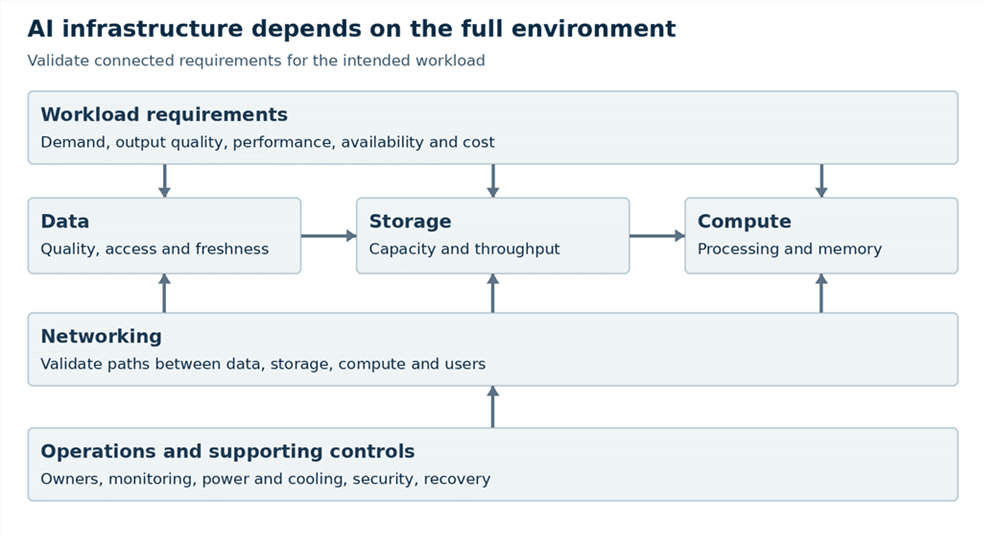
Illustrative dependency map to guide a workload-specific assessment.
Review the dependencies together. A compute upgrade may accomplish little if storage cannot supply data quickly enough or if the application spends most of its time waiting on another service. Trace the complete workflow before choosing the component to improve.
Define the workload before selecting infrastructure
Start with one prioritized use case and the business result it should support. Identify the users, the decision or task being assisted and how the organization will judge usefulness. Agree on acceptable output quality alongside speed and availability.
Describe the workload in terms engineers can test. Is it document retrieval, image analysis, forecasting or another task? Will the team train a model, adapt an existing one or run inference using a pretrained model? Will processing happen interactively, in scheduled batches or at the edge?
Capture the intended deployment boundary. Public cloud, on-premises, edge and hybrid options should be evaluated against data requirements, connectivity, demand and operating capabilities. For a hosted model service, include service quotas, provider availability and the location of requests and outputs in the assessment.
Netsync’s AI strategy and readiness services address use-case prioritization, readiness assessments and governance and operating-model recommendations. Establishing those priorities gives infrastructure planning a defined problem to solve.
Use a workload worksheet before requesting equipment or service pricing. It should record the expected demand, required performance, availability needs, data dependencies and assumptions that a pilot must validate.
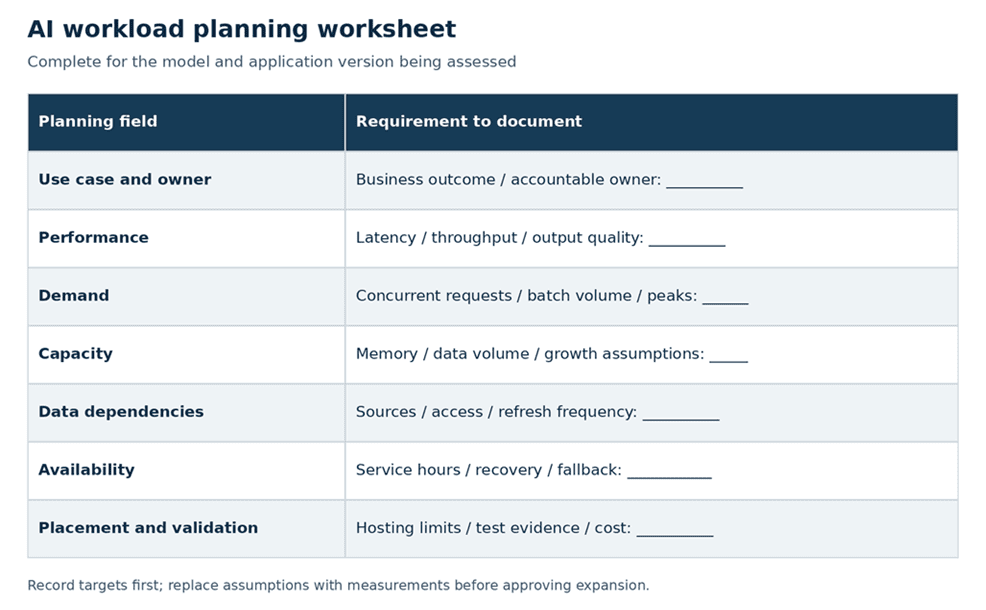
Planning worksheet to connect business requirements with technical validation.
Keep the worksheet tied to the model and application version tested. A change in model, input size or retrieval approach can alter resource demand. Revisit the sizing assumptions when the design changes rather than carrying the original estimate into production unchanged.
Assess data, compute, storage, and networking
Data readiness comes first. Identify authoritative sources, data owners, permitted uses and refresh requirements. Check whether the data is accessible in a usable format and whether it is complete enough for the intended task. For an assistant using internal documents, verify that retrieval respects each user’s access permissions.
Document how data moves through preparation, retrieval or model execution and into outputs and logs. Include temporary copies and derived datasets. This map helps expose hidden transfers, stale inputs and systems that may become bottlenecks.
Then assess the architecture as a connected environment. Compute sizing should account for processor capability, system memory, accelerator memory where applicable and software compatibility. Storage assessment should cover usable capacity, access patterns, storage throughput and latency. Network capacity should reflect data movement and application traffic, including remote users and connections between hosting locations.
Netsync’s secure AI infrastructure services assess workload placement and infrastructure requirements across compute, storage, networking, security, resilience and facilities. That breadth is useful when determining which dependency will constrain a proposed deployment.
Training and inference requirements
Training develops a model from data; fine-tuning further trains an existing model for a narrower purpose. Inference uses a trained model to produce an output. These activities need separate workload sizing because their schedules, resource demands and service expectations can differ substantially.
Ask what the organization actually intends to operate. Consuming a hosted model through an application does not mean you must build infrastructure for training that model. Running local inference also does not automatically require dedicated graphics processing units, or GPUs.
Microsoft’s guidance for local inference notes that some models run on central processing units, or CPUs, while other workloads benefit from GPU acceleration. The decision depends on the model, memory needs, concurrency and performance targets. Benchmark the intended model and runtime before deciding whether dedicated accelerators are necessary.
For generative AI, include representative input and output lengths in testing. A short demonstration prompt does not establish capacity for longer documents or many simultaneous users. For batch workloads, define the volume that must finish within the processing window and test against that requirement.
Capacity, performance, and growth assumptions
Measure the whole application’s response time, including data retrieval, model execution and any downstream action. Track throughput, errors and queueing alongside latency. Inspect slower requests as well as averages so a few quick responses do not obscure a poor experience under load.
For example, a hypothetical internal assistant may perform well for five pilot users and slow down when several departments use it at once. Before expanding compute, determine whether the delay comes from model execution, document retrieval, network paths or request limits in a hosted service.
Test representative peak demand, not just steady traffic. Include data refreshes or other jobs that may compete for the same resources. Record the environment, workload and configuration used so later comparisons remain meaningful.
Separate committed demand from possible growth. Build scenarios for expected adoption and higher demand, then identify the lead time and trigger for expanding capacity. Plan spare capacity around measured variability and service needs rather than assuming a universal percentage applies to every AI project.
Validate power, cooling, security, and recovery
For infrastructure hosted in your facilities, verify physical feasibility before procurement. Have qualified facilities personnel review rack capacity, electrical distribution, cooling capability and any changes required for the proposed equipment. Confirm readiness against the actual configuration, including the cooling method it requires.
Assess the facility’s ability to sustain expected operating conditions, not simply whether equipment fits in a rack. Establish who monitors power and environmental conditions and how those alerts reach the operating team. Include facility upgrade costs and lead times in the deployment plan.
Cloud hosting shifts the facilities responsibility but leaves architecture and service planning work. Confirm capacity availability, quotas, network paths and the cost of moving data between environments. Determine how the application behaves if a dependent service becomes slow or unavailable.
Security readiness should establish that the planned workload can operate within approved boundaries. Verify identity and access controls, data handling, separation between environments and logging appropriate to the use case. Include model artifacts, prompts, retrieved information and outputs in that review. Keep sensitive information out of broadly accessible diagnostic records.
Recovery planning needs an application-level view. Identify the data, model versions, configuration and supporting services required to restore operation. Define acceptable interruption and data-loss limits with business owners. Test recovery against those objectives and confirm how users will work while the AI service is unavailable.
A valid fallback may be a manual workflow, a restricted service or a previously approved model version. Document its limitations and the person authorized to activate it. If failure could affect a critical business process, resolve the recovery gap before expanding production use.
Establish ownership and operational readiness
Assign operating ownership before the pilot becomes a business dependency. Infrastructure staff may manage capacity and availability, while application and data teams own model integration, source quality and refresh processes. Make those boundaries explicit and identify one accountable service owner who can coordinate decisions.
The operating plan should explain who handles alerts, user issues, model changes, security incidents and unexpected spending. Define escalation contacts and support hours. Confirm that staffing and support agreements match the service expectations communicated to users.
Monitor usefulness as well as infrastructure health. The National Institute of Standards and Technology’s AI Risk Management Framework 1.0 calls for evaluation under conditions similar to deployment and monitoring of AI system behavior in production. A healthy host alone cannot tell you whether an application’s outputs remain fit for purpose.
Document a repeatable release process. Record approved model and application versions, test results and configuration dependencies. Identify which changes require renewed performance, quality or security checks, and maintain a way to revert or suspend a release when necessary.
Production readiness should be an evidence-based decision with business participation. Confirm representative load testing, acceptable output quality, approved data use, tested recovery and a receiving team prepared to operate the service. Record unresolved issues and any approved exceptions with owners and review dates.
Score readiness and prioritize the next investment
Use a readiness scorecard to organize the discussion, while keeping critical blockers visible. The example below groups enterprise AI infrastructure requirements into practical review areas. It is an editorial planning tool, not an industry certification or a substitute for technical validation.
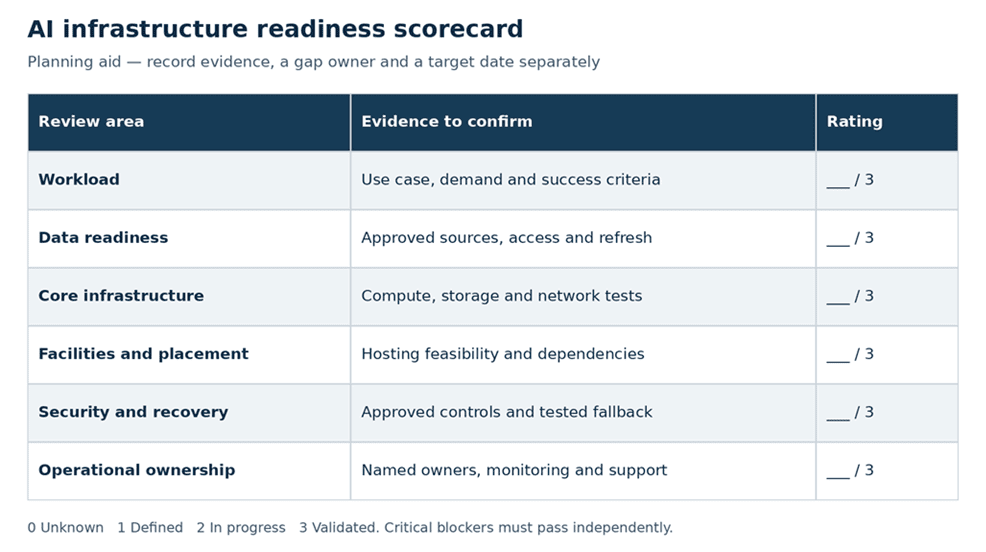
Suggested readiness ratings; critical blockers require separate resolution.
Rate each area from zero to three: zero means unknown, one means requirements are documented, two means implementation is underway but evidence is incomplete and three means the agreed requirements have been validated for the intended deployment. Add supporting evidence, a gap owner and a target date to the working assessment.
Avoid using a total score as permission to launch. Strong compute capacity cannot offset unauthorized data use. Likewise, good security documentation cannot compensate for a service that fails its required workload tests. Establish the nonnegotiable conditions for your project and require them to pass independently.
Prioritize spending by the constraint it removes and the value of resolving it. If data access is the blocker, fund the work needed to make the approved data usable. If representative tests show a compute bottleneck, evaluate capacity options against the measured demand. If there is no support owner, resolve staffing or service coverage before purchasing more infrastructure.
Compare the full cost of the workable options. Include integration, data preparation, software, consumption charges, facilities work and ongoing operations as applicable. Keep the assumptions visible and identify which costs change with adoption. A low acquisition price is only one part of the decision.
End the assessment with a specific recommendation: proceed within tested limits, approve a targeted improvement, run a focused validation or defer the project until a blocking condition is resolved. For every investment request, state the constraint, supporting evidence, expected benefit and test that will show whether the investment worked.
AI readiness is established for a particular workload at a particular scale. Reassess it when demand, data or service expectations change. That gives the CTO a practical way to expand with evidence while keeping the next investment tied to an actual business requirement.
Plan your next step with Netsync
Schedule an AI readiness conversation. Bring Netsync your prioritized use case, current environment and open questions to discuss the infrastructure and operating requirements that need validation.
Frequently asked questions
Does every enterprise AI project require dedicated GPUs?
No. Some inference workloads can run on CPUs, and an application using a hosted model service may not need local model-serving hardware. Other workloads benefit from accelerators. Select resources based on model compatibility, memory requirements, expected demand and measured performance rather than assuming every AI project needs a dedicated GPU environment.
What should an AI infrastructure assessment cover?
An assessment should cover the use case, workload sizing, data readiness, compute and memory, storage performance, network capacity, hosting options, power and cooling where applicable, security, recovery and operating ownership. It should identify tested capabilities, unverified assumptions, blocking gaps and the cost and responsibility for addressing each material issue.
How do you know an AI pilot is ready for production?
A pilot is ready when evidence shows it meets agreed requirements under representative conditions. Confirm workload performance, output quality, permitted data access, security controls, recovery procedures, monitoring and assigned support ownership. Document acceptance and unresolved issues. A successful demonstration with a small user group is insufficient to establish production readiness on its own.


