How to Choose Enterprise Cloud Storage
A cloud storage proposal might tell you exactly what a terabyte costs without explaining how the service will behave when your order system is busy or your team needs to restore it. Those questions take more work to answer, yet they have far more bearing on whether the purchase will serve the business.
Choosing enterprise cloud storage starts with understanding what the applications need from it. The requirements for an active database will differ from those for an archive, even when the datasets are similar in size. Access patterns, recovery expectations, and the cost of moving data all influence the design.
For CTOs and infrastructure leaders, the task is to turn those differences into requirements that can be tested. With that groundwork in place, proposals become easier to compare, and the reasoning behind the investment becomes easier to explain.
What should enterprise cloud storage deliver?
Enterprise cloud storage supports organizational data through cloud services. That can include application volumes, shared files, backups, and archives. Although these uses fall under the same broad category, they place different demands on the infrastructure.
An order database, for instance, needs predictable response times while transactions are being processed. A repository of completed projects may go untouched for months, provided the team can retrieve a record when needed. Buying the same performance for both could mean paying for capabilities the archive rarely uses or accepting delays the database cannot tolerate.
Enterprise cloud storage requirements should make those distinctions explicit. “Fast recovery” leaves too much room for interpretation. A recovery target for a named application gives the evaluator something to verify. Similarly, a capacity forecast becomes more useful when it includes expected growth and the time needed to make additional resources available.
The requirements also need to explain how the service will be run. Someone must approve access, manage encryption keys, and respond when protection jobs fail. If those responsibilities are unclear during evaluation, the team could discover the gap during an outage. Our enterprise cloud storage solutions address backup, replication, restoration, and centralized administration; the assessment determines how those capabilities fit your environment.
Match storage requirements to business workloads
An application inventory gives the evaluation a starting point, but a list of systems and their storage allocations won’t explain how the data is used. The useful details come from the people responsible for each application: how often the data changes, who needs it, and what happens when access is interrupted.
Consider a hypothetical manufacturer with an order database, shared engineering files, and an archive of finished projects. The database needs storage compatible with its transaction requirements. Engineers need reliable file access and permissions that work across locations. The archive needs a retention policy and a retrieval process that won’t leave someone waiting indefinitely for an old drawing.
Those differences affect the storage interface as well as its performance. A database may require block storage presented as a volume. Engineering software may expect a file system, while a backup application may write to object storage through an application programming interface, or API. Application support needs to be confirmed before one storage type is substituted for another.
Location follows from the same reasoning. If a production process must continue during a connectivity outage, the design may need local storage or caching. That introduces another consideration: how updates are reconciled when connectivity returns. These are decisions to resolve during hybrid cloud planning, alongside the readiness and migration work needed to put the design into operation.
The inventory should account for more than today’s active data. Retained versions, backup copies, and planned AI datasets can materially change the capacity forecast. A conversation about retention belongs here, too. Data that nobody has approved for deletion can keep growing long after the application that created it has stopped needing it.
Evaluate performance, access, and data movement
Performance becomes easier to evaluate once the workload is understood. Large file transfers depend heavily on throughput, the volume of data moved over time. Frequent small transactions may be more sensitive to latency, the delay in completing an operation. Input/output operations per second, or IOPS, adds another measure of how much activity the service can handle.
None of these figures describes the application experience by itself. A service may deliver high throughput in a test with large files and behave differently under thousands of small requests. Microsoft’s storage performance documentation notes that achieved request rates and bandwidth depend on object sizes, access patterns, and workload type. It also recommends placing storage near clients to reduce network latency.
A proof of concept should therefore resemble the way the application will run. That means using representative data over the intended network path, including activity from remote locations. Backup jobs and other background work belong in the test if they will compete for resources in production. Results should include slow requests and failures as well as averages, because an acceptable average can conceal delays that users notice.
Access controls deserve the same practical scrutiny. The team should be able to demonstrate how a user receives permission and what happens when that permission is removed. Administrative access needs particular attention, including multifactor authentication and control over changes to network exposure, retention, and encryption keys.
Data movement adds a different set of demands. Routine replication may transfer small amounts throughout the day; a restoration could require a large dataset in a short window. The evaluation needs to account for both. An export test is useful here because it reveals whether the data can leave in a usable form, with the permissions and metadata the next system will need.
Define resilience and recovery requirements
Keeping data available during a hardware failure is different from recovering a file that was deleted yesterday. A design may handle one situation well and offer little protection against the other. The recovery discussion needs to identify which events the organization expects to withstand.
The location of a copy is only part of that discussion. A copy in another facility may still be exposed if the same compromised administrative identity can delete it. What matters is which failures each copy can survive and whether the team can use it when the primary environment is unavailable.
Recovery time and recovery point objectives
The National Institute of Standards and Technology’s contingency planning guide distinguishes recovery time objective, or RTO, from recovery point objective, or RPO. RTO sets a limit on how long a system resource can remain unavailable before the impact becomes unacceptable. RPO identifies the point in time to which data must be recovered, expressing how much recent work could be lost.
Suppose the manufacturer sets a two-hour RTO and a 15-minute RPO for its order application. A nightly backup alone would leave too much recent data exposed to loss. Even with more frequent protection, the team would still need to show that the recovery process fits the two-hour target.
That process extends beyond copying data back. The application also needs working identity services, network access, configuration, and encryption keys. Its owner needs time to verify that it is usable. A storage restore that consumes the entire recovery window leaves no time for those dependencies, so the storage target has to fit within the broader application recovery plan.
Backup isolation and restoration testing
The joint CISA and MS-ISAC StopRansomware Guide recommends offline, encrypted backups and regular tests of their availability and integrity. Its warning about accessible backups is relevant to cloud designs: an attacker may try to delete or encrypt the copies the organization intends to recover from.
The evaluation should establish who can administer recovery copies and which changes those permissions allow. Where immutability is part of the design, the retention settings and authority to alter them need to be understood. A feature’s presence in a proposal doesn’t establish that it has been configured to address your recovery scenarios.
Restoration testing supplies the evidence. Recovering representative data into a controlled environment allows the team to check integrity and measure elapsed time. Having the application owner validate the result also catches problems that a completed backup job won’t reveal. The findings become part of the recovery procedure, which needs to be tested again on an agreed schedule and after material changes.
Calculate total cost beyond capacity
A capacity rate is relatively easy to compare. Cloud storage total cost takes more analysis because the bill also reflects what happens to the data. AWS’s published object storage pricing, for example, separates storage from requests, retrieval, data transfer, replication, and management features. The applicable charges will depend on the proposed service and configuration.
The workload inventory provides the assumptions for a useful estimate. An archive that is rarely opened has a different cost profile from an equally large dataset that is exported every week. Data growth matters, but so do the number of copies and the frequency with which applications read or move them.
For each proposal, the cost model should cover:
- Stored capacity, including retained versions, backups, and replicated copies.
- Application requests, archive retrieval, and lifecycle transitions where charged.
- Data transfer costs for the actual replication, export, and recovery routes.
- Connectivity and operating costs, including monitoring, key management, support, and administration.
- One-time migration work and the eventual cost of exporting or transitioning the data.
Storage tiering needs a closer look when a lower capacity rate comes with minimum storage durations, retrieval charges, or early-deletion terms. Moving a large number of small objects between tiers can also introduce request costs. The model needs to reflect those actions rather than just the volume left in each tier at month-end.
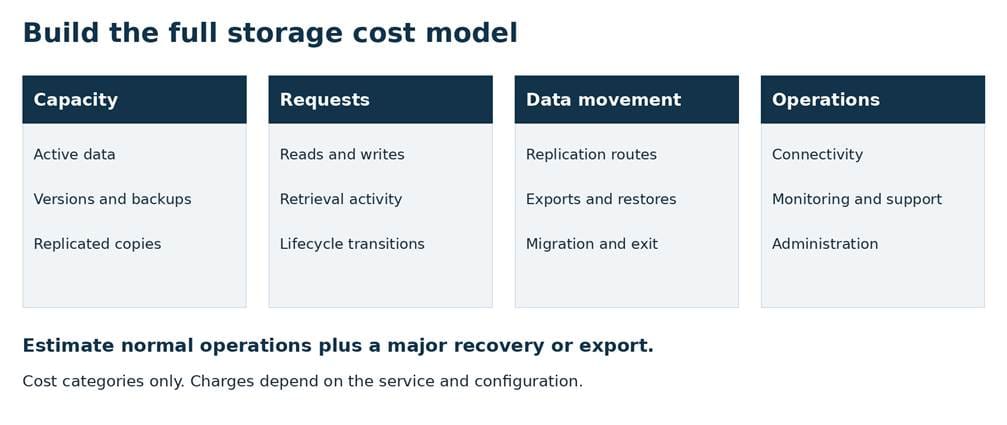
An ordinary month won’t reveal every expense. A second scenario covering a major restoration or export can show the cost of an event the business may otherwise overlook. A higher-growth case helps identify when the assumptions stop holding. Finance and infrastructure teams can then see which costs are predictable and which depend on behavior or an exceptional event.
Build a storage requirements scorecard
By this stage, the team should have enough evidence to compare designs against the same requirements. A scorecard makes that comparison visible, provided it distinguishes mandatory criteria from preferences. An option that fails application compatibility or an approved data-location requirement should not advance simply because its price earns a higher score.
For the options that meet those conditions, weights can reflect business priorities. A transaction system might put greater weight on demonstrated performance, while an archive gives more weight to retention and retrieval costs. Whatever scale is used, an evaluator should be able to explain what earns a score. An untested promise belongs in the record as unverified.
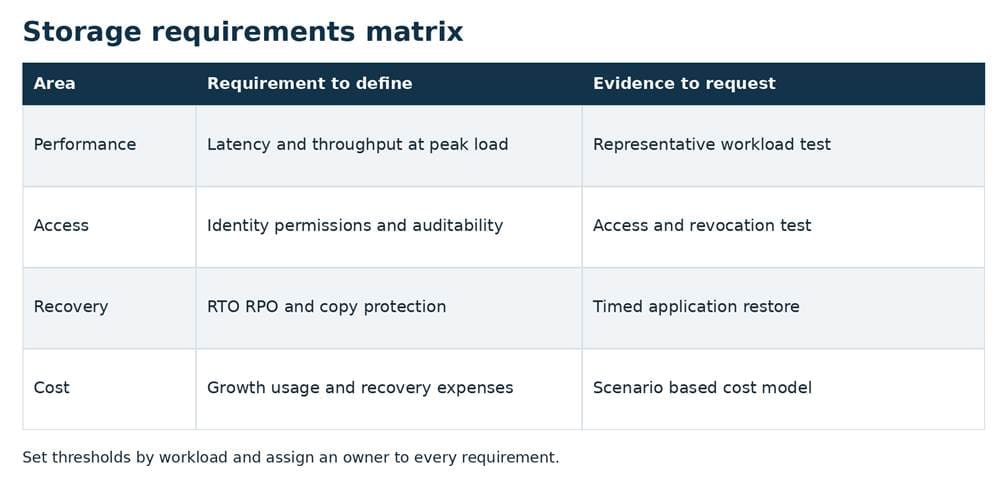
The requirements matrix provides a starting point. Adding the test result, evidence location, and responsible owner turns it into a working decision record. Exceptions should include the impact and the person authorized to accept it, so they remain visible after procurement hands the project to operations.
A final walkthrough with operations can expose unfinished work: an access change that requires an undocumented step, for example, or a recovery procedure that assumes someone else has the keys. Resolving those details before approval gives the implementation team a plan it can follow. The same record can support later reviews when growth or an application change makes it time to revisit the design.
If you’re developing storage requirements or evaluating a proposal, we can help connect the workload, recovery, and cost decisions. Review your storage requirements with Netsync.
Frequently asked questions
How is enterprise cloud storage different from file sharing?
File sharing focuses on people accessing and collaborating on files. Enterprise cloud storage covers a broader range of uses, including application volumes, object repositories, backups, and archives. The evaluation needs to consider how each workload accesses data, performs under load, and recovers after a disruption, along with its governance requirements.
Which costs should a cloud storage evaluation include?
Start with capacity, then add applicable request, retrieval, replication, and data transfer charges. The estimate should also cover connectivity, administration, protection, and support, plus migration and eventual export. Model a major restoration or export separately so its cost isn’t hidden by the estimate for a routine month.
How should storage requirements reflect recovery objectives?
RPO helps determine how frequently data needs protection and how much recent work could be lost. RTO constrains the time available for recovery. Storage restoration must fit within the application recovery process, including its dependencies and validation. A representative recovery test is the way to check whether the proposed design supports both objectives.


