VMware Infrastructure Planning Before Your Next Renewal
Your VMware renewal is approaching, and the infrastructure team has last year’s host count, a growing list of application requests, and several hardware refresh decisions still open. Procurement needs a number. Operations needs to know whether the environment can handle another year of growth and planned maintenance.
VMware infrastructure planning brings those questions into one review. Start with the workloads the business needs, measure the resources they use, and validate the lifecycle and commercial requirements of the environment you intend to operate. A renewal decision becomes easier to explain when it rests on current evidence.
What CTOs and infrastructure leaders need is a roadmap that connects technical work with budget approval. It should identify what requires attention before renewal, what can follow later, and who owns each decision.
What should you review before a VMware renewal?
A VMware renewal review should cover workload demand, available capacity, availability requirements, software and hardware support, and the entitlements needed for the planned environment. Each part affects the others. A proposed host retirement, for example, can change failover capacity, maintenance options, and the inventory used to validate licensing quantities.
Start by agreeing on the planning horizon and renewal deadline. Record the procurement cutoff, internal approval lead time, and any change freezes. Then identify business changes expected during the next term, including new applications, acquisitions, or increases in transaction volume. Ask application owners which plans are funded and which remain tentative.
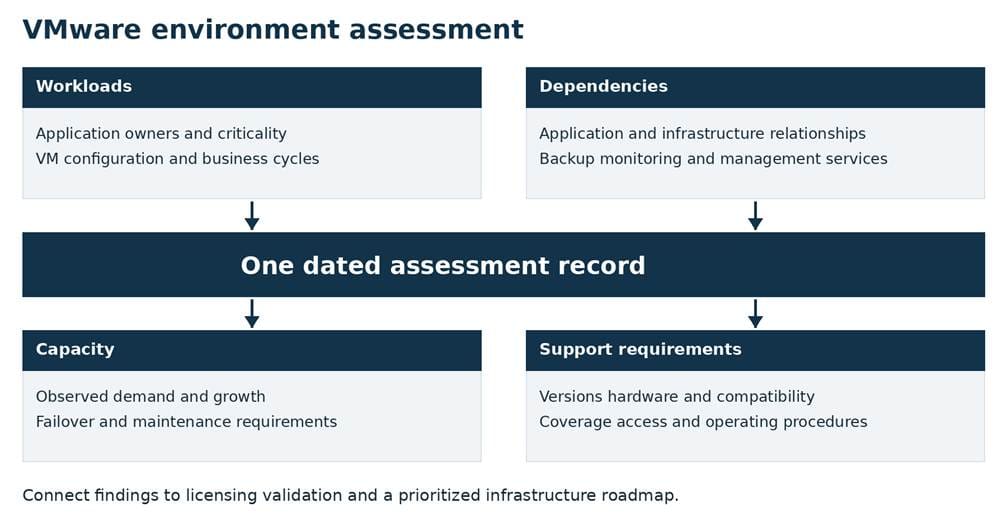
Give the review an accountable lead and involve operations, application owners, security, and procurement where their decisions are needed. Keep one dated assessment record so teams can trace the recommendation back to the same inventory and assumptions.
A focused VMware environment assessment should answer a practical question: can the proposed configuration support the business through the next planning period, including expected growth and maintenance? Netsync’s virtualization services include VMware vSphere. Use the assessment to establish which design and implementation work the environment requires before asking for a final renewal proposal.
Inventory workloads, dependencies, and utilization
Begin with a workload inventory that connects virtual machines to business services. A virtual machine name rarely tells the whole story. Record its application, owner, environment, criticality, and expected retention or retirement date. Include management components and workloads that run only during specific business cycles.
For each cluster, collect host models, processor configurations, memory, datastore information, and installed VMware versions and builds. Identify which hosts belong in the renewal scope and which are awaiting a confirmed retirement decision. Reconcile discovered assets with documentation rather than assuming either source is complete.
Map application dependencies before proposing changes. An application might rely on a database in another cluster, shared authentication, a scheduled integration, and a backup service with its own support requirements. Have the application owner validate the map. This helps expose the work that must happen before a host can be removed or a software component upgraded.
Utilization data should cover representative demand. Include business peaks, batch processing, and backup windows. If the collection period misses an annual enrollment cycle or seasonal sales surge, use historical evidence and label the remaining uncertainty. Record collection dates and sampling intervals so reviewers understand what the measurements capture.
Examine allocated and consumed resources separately. A virtual machine’s assigned processors and memory describe its configuration; observed use helps explain demand. Review CPU contention indicators, memory pressure, storage latency, and network activity alongside application response times. Low average CPU use alone does not establish that a workload can be reduced safely.
Consider a hypothetical finance application that appears quiet most of the month but runs intensive reporting at quarter-end. Reducing its allocation based on an ordinary week could affect a critical business deadline. Identify a candidate change, agree on a test with its owner, and measure the result through the relevant cycle before accepting it into the plan.
Align capacity with availability requirements
VMware capacity planning needs to account for the conditions under which the business expects applications to keep working. Available resources during a normal day are only part of that calculation. Model the effect of a host failure and the capacity needed to take equipment offline for maintenance.
Broadcom’s guidance on insufficient vSphere High Availability, or HA, failover resources recommends determining how many host failures the cluster must tolerate and planning enough remaining resources to satisfy workload demand. Apply that principle to the specific cluster configuration and application priorities in your environment.
For example, a hypothetical cluster may look comfortably utilized with every host online. Remove one host for patching, then account for a concurrent failure, and the remaining capacity could be inadequate for the agreed operating scenario. Decide whether that combination must be supported and document the answer. Avoid applying the same spare-capacity percentage to every cluster without considering its requirements.
Review HA admission control, virtual machine reservations, and placement restrictions with the team responsible for the design. Determine whether critical workloads can run on the remaining eligible hosts. A cluster-wide resource total can obscure constraints that apply to an individual application.
Include storage and network behavior in the assessment. Confirm that planned growth will fit the available capacity and that maintenance procedures preserve the required access paths. Where applications need recovery beyond a local host failure, review the separate backup and recovery process, including its dependencies and test evidence.
Build a baseline forecast and a higher-demand scenario tied to specific business plans. Identify the metric that would trigger expansion, the lead time to act, and the person responsible for monitoring it. This gives operations a way to respond before growth consumes the capacity reserved for availability.
Review lifecycle and support requirements
Lifecycle planning should connect the versions you run today with the versions and hardware you expect to support during the renewal period. Record applicable support milestones for each deployed product and confirm them against current Broadcom lifecycle information. Keep those dates distinct from subscription expiration and hardware support dates.
A renewal does not, by itself, demonstrate that the installed environment meets every technical support requirement. Review the deployed configuration, the planned upgrade path, and the coverage associated with the agreement. Assign an owner to resolve any uncertainty before the final recommendation goes to procurement.
Infrastructure compatibility and dependencies
Broadcom’s Product Interoperability Matrix provides checks for VMware product interoperability and supported upgrade paths. Use it to validate the actual source and target versions in the plan. Record the result and its verification date, including any intermediate steps the upgrade requires.
Hardware needs a separate check. Broadcom’s ESXi compatibility guidance calls for validating the server platform against the intended release and reviewing relevant BIOS and firmware requirements. Include network and storage adapters, their driver and firmware combinations, and any hardware-specific upgrade prerequisites in the assessment.
Extend the review to the services that manage and protect the VMware environment. Confirm the supported combinations for backup integrations, monitoring, and application dependencies before scheduling an upgrade. A supported destination version is useful only when the surrounding services are ready to work with it.
If a compatibility issue requires a hardware refresh, put the procurement and installation dependencies on the same schedule as the software work. Document the required maintenance window and the tests that will establish readiness afterward.
Documentation and operational readiness
Review whether another qualified administrator could follow the operating documentation. Verify the accuracy of cluster diagrams, host inventories, administrative access records, and escalation contacts. Identify where configuration backups and recovery instructions are kept, and confirm that the appropriate staff can access them during an incident.
Test support access before it becomes urgent. Have authorized staff confirm the organization’s entitlement visibility and ability to follow the applicable case-opening process. Reconcile account and site information with the agreement. List the support requirements of critical applications, including the internal response and escalation process.
For planned changes, identify who will perform the work, what training is needed, and how the team will validate application service afterward. Include rollback criteria and communication responsibilities. Operational readiness should have evidence and owners just as capacity planning does.
Validate current licensing and commercial requirements
Use the assessed environment to validate the renewal proposal. Reconcile the product names, quantities, subscription term, support coverage, and deployment scope against current Broadcom documentation and the proposed agreement. Keep last year’s order as a reference, then verify what applies to this transaction.
Broadcom’s core-counting guidance states that VMware Cloud Foundation, or VCF, and VMware vSphere Foundation, or VVF, licensing is based on physical processor cores across the ESXi hosts being licensed, with a minimum of 16 cores per physical processor. For those offerings, a virtual machine count or a utilization percentage is not the licensing quantity. Reconcile processor-level inventory with the applicable counting method.
Where vSAN is in scope, validate storage entitlements and any additional capacity requirements separately. Have the commercial review document which quantities are included and which require additional licensing. Avoid calculating a final order from an incomplete host export or an assumed entitlement.
Version-specific procedures matter as well. Broadcom documents a changed licensing workflow for VCF and VVF 9.0 that uses VCF Operations rather than the traditional application of 25-character keys to ESXi and vCenter. If your roadmap includes that release, account for the management workflow and its prerequisites. Confirm the exact procedures for the version being deployed.
Ask for written resolution of discrepancies between the inventory, proposed configuration, and quote. Review expansion assumptions, effective dates, and administrative responsibilities before approval. Any proposed consolidation should remain conditional on capacity, compatibility, and application validation; do not count anticipated savings as established until those decisions are complete.
Build a prioritized infrastructure roadmap
Organize the findings by the decision they affect and the date action is required. Give each item an owner, a dependency, a budget assumption, and a measurable completion condition. Make unresolved commercial questions visible alongside technical work so neither is lost during handoff.
Use three practical planning groups:
- Before renewal approval: reconcile the inventory and quote, confirm required coverage, and resolve gaps that could change the purchase decision.
- During the next approved change windows: complete validated configuration changes, upgrades, or refresh work with testing and rollback plans.
- Through the next planning period: monitor growth, revisit deferred items, and update the forecast as business requirements change.
Sequence the work according to its dependencies. If a software upgrade needs compatible hardware, the hardware validation and purchase belong earlier on the schedule. If a proposed retirement depends on application-owner approval, retain that dependency in the forecast until approval and testing are complete.
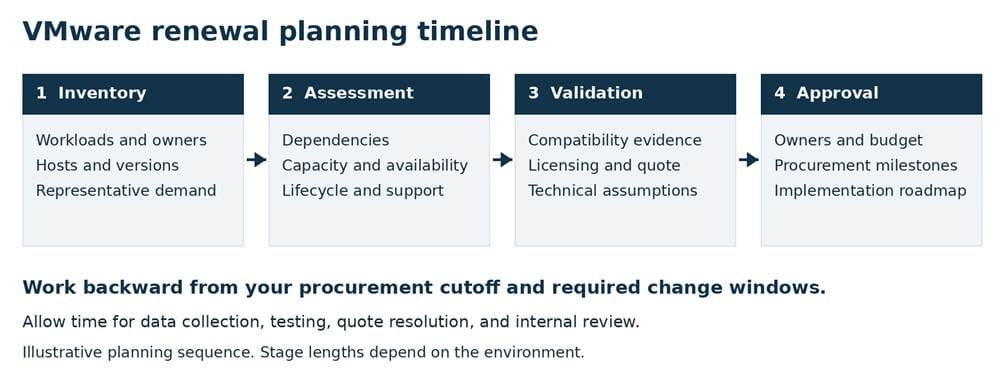
The planning timeline is a sequence to adapt to your environment. Work backward from procurement and implementation deadlines. A contained review with reliable data may need less time than an assessment involving multiple sites, hardware purchases, and several application owners. Leave room to collect representative utilization and resolve questions before the approval cutoff.
Netsync’s lifecycle management services include inventory review, asset valuation for forecasting and project planning, and contract coverage advisement. Connect those activities with the VMware assessment so the roadmap reflects both operational needs and renewal timing.
Before closing the review, have the responsible teams approve the assumptions that affect their work. Set a date to revisit the plan and define triggers for an earlier review, such as a major workload addition or a change in hardware support. VMware renewal planning is most useful when the approved roadmap continues to guide infrastructure decisions after the order is placed.
Bring your workload findings, capacity forecast, and renewal milestones into a planning conversation with Netsync. Discuss your VMware infrastructure roadmap.
Frequently asked questions
What information should be collected before a VMware renewal?
Collect a dated host and workload inventory, processor configurations, VMware versions and builds, utilization history, application dependencies, and availability requirements. Add lifecycle milestones, support coverage, current entitlements, and procurement deadlines. Reconcile that evidence with the environment planned for the next term before validating the quote.
How should utilization inform infrastructure planning?
Use representative utilization to identify constraints, growth trends, and candidates for configuration changes. Review peaks and business cycles alongside averages, allocated resources, and application behavior. Validate proposed changes with application owners while preserving the capacity required for maintenance and the agreed failure scenarios.
How far ahead should a renewal assessment begin?
Begin early enough to collect representative data, validate technical and commercial requirements, and complete internal approvals before the procurement cutoff. Work backward from that cutoff and any required implementation dates. Allow additional time for hardware purchases, incomplete inventories, multiple sites, or seasonal workloads; there is no single lead time that fits every environment.


