How to Secure AI Workloads in the Data Center
An AI pilot can answer questions convincingly and still leave your organization unprepared to run it safely. Before it reaches production, your team needs to understand which records it can retrieve, who can change its configuration, and how to restore service after a failure or compromise.
Running the application in your own data center gives you control over the environment. It doesn’t automatically contain the data or secure every connection. Model downloads, document connectors, remote support, and external services can all extend the application’s reach.
For IT leaders, securing AI workloads means looking beyond the model server. The priorities are familiar: limit access, protect sensitive data, and make sure the people operating the service can detect trouble and recover. AI adds dependencies that your team needs to examine before approving production use.
Start With What the Application Can Reach
Consider a hypothetical internal knowledge assistant. Employees use it to ask about company policies. The model server may have strong protections, but its document connector might use an account that can read every departmental file share. If the application fails to enforce each employee’s permissions, it could return information that person shouldn’t see.
That risk exists even when the application only performs inference, using an existing model to produce results. It doesn’t need to train on company documents to expose them through retrieval.
Ask your architects to trace a request from the user through every service that helps produce the response. Map document ingestion separately, and include exports, temporary files, telemetry, and outbound connections. For each connection, identify the account, allowed actions, and sensitivity of the data involved.
Then examine who can change those connections. Give every service account an owner and a defined purpose. Does ingestion need permission to write to its source? Can the application reach an administrative interface? Put the answers into enforceable settings, rather than leaving them as assumptions in a design document.
Keep administrative access distinct from ordinary use. A person who can ask the assistant a question should not automatically gain the ability to change its model, retrieve credentials, or redirect its data source. Map human privileges separately from the identities that software uses, so reviewers can see where either could cross an intended boundary.
Our secure AI infrastructure services bring workload placement together with compute, storage, networking, and security architecture. Addressing these dependencies during design gives teams a chance to resolve them before production commitments make changes more difficult.
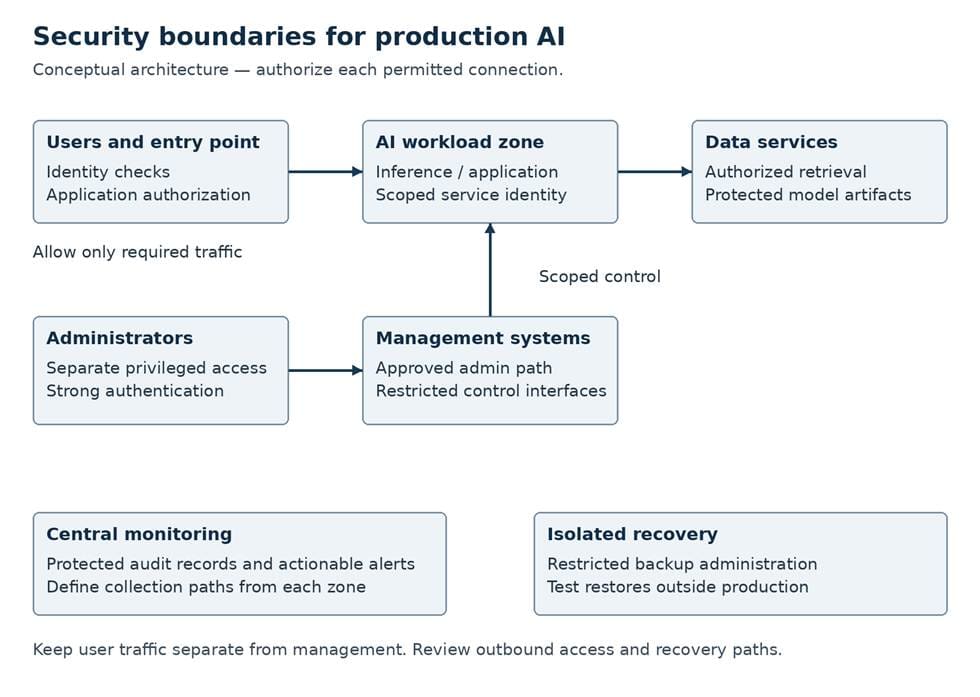
Conceptual architecture. Authorize and test each required connection.
Use Segmentation to Enforce Clear Boundaries
Separate user entry points, AI processing, data services, and management systems according to their roles and sensitivity. Allow the connections each function requires, and give development and production environments deliberate access paths. Broad connectivity inherited from a pilot deserves particular scrutiny.
NIST’s Zero Trust Architecture makes the underlying principle clear: physical or network location alone should not establish trust. An AI workload inside the data center still needs identity checks and authorization for the resources it accesses.
Pay close attention to the management plane: the systems that administer clusters, virtualization, servers, and deployments. Restrict them to approved administrative paths. Employees using an AI application should have no routine route to the systems controlling it.
Administrators should use separate privileged accounts and phishing-resistant multifactor authentication where supported. Limit remote support access, make it temporary when feasible, and record approval. Protect service credentials and establish how teams will rotate or revoke them.
Also review outbound traffic. A production model server shouldn’t retain unrestricted internet access simply because the pilot used it. Test restrictions against legitimate dependencies, including updates and certificate validation. Where workloads share hosts or accelerators, have the platform team explain the isolation controls and remaining risks; separate namespaces or virtual networks alone don’t establish complete tenant isolation.
Protect the Data the Application Creates
AI applications can leave sensitive information in prompts, retrieved context, generated responses, diagnostic logs, and caches. Decide which copies you need, who can access them, and when to delete them. Include indexes and embeddings, the numerical representations used for similarity search. Creating embeddings does not guarantee anonymity.
For retrieval applications, test permissions throughout the request. Access to the assistant must not become access to every document its connector has indexed. Test with accounts from different departments and access levels, including someone whose permissions have recently changed.
Encrypt sensitive data at rest and in transit, and document who owns the keys and how to recover them. Encryption cannot prevent an application from returning information its active credentials allow it to read. Your review needs to cover authorization as well.
Logging requires judgment. Investigators need useful evidence, but prompts and responses may contain confidential material. Have data owners approve retention, redaction, and access rules, including how deletion requirements affect recovery copies.
Control What Reaches Production
Treat a model change as a controlled software release. NIST SP 800-218A recommends tracking provenance and verifying acquired AI components. Maintain an approved inventory of model versions, dependencies, and sources, and name the person who can approve each release.
For models your organization develops or fine-tunes, protect model weights and configuration from unauthorized access or modification. Operators should be able to identify the approved model and dependencies actually running.
The surrounding platform needs the same discipline. Assign maintenance owners for hosts, AI runtimes, drivers, firmware, and orchestration software. Test updates against representative workloads and document rollback steps. A vulnerable host or forgotten service account can undermine controls elsewhere.
Give Responders Evidence and Authority
Collect authentication events, privileged actions, deployment changes, model releases, and relevant data access records where supported. Protect those records from modification by the workload they describe. Consistent timestamps and identifiers help investigators connect an unusual export with the requesting account or a recent permission change.
Monitor service health alongside security events, but interpret signals carefully. A utilization spike could reflect an expected job, an application fault, or suspicious activity. Agree on how teams will investigate before automating actions that could interrupt production.
Name the initial response owner and identify who can revoke access, isolate a workload, or roll back a release. Practice a specific scenario: an ingestion credential leaks and an unfamiliar client begins reading documents. Who stops ingestion? What evidence survives? How does the team verify replacement credentials before restarting? The exercise should expose gaps while there is still time to fix them.
Prove That Recovery Works
A usable recovery plan covers the model version, runtime configuration, application code, infrastructure definitions, and retrieval data or a way to rebuild it. The team also needs access to keys and credentials without depending entirely on the failed environment.
CISA’s StopRansomware Guide recommends offline, encrypted backups and regular recovery testing. Ask whether a compromised production or management account could delete backups or change retention settings. Immutable storage can help when configured appropriately, but it still needs independent access controls and restore tests.
Restore the application in an isolated environment. Confirm that it starts, loads the approved model, enforces permissions, and returns expected results. Measure the time against the business’s recovery objective, and record missing dependencies or manual steps that cause delays.
Make the Release Decision with Evidence
Before launch, bring infrastructure, security, application, and data owners together to compare the deployed configuration with the approved design. Test denied access as carefully as successful access: an unauthorized user should fail to retrieve restricted documents, and production credentials should fail to alter protected backups.
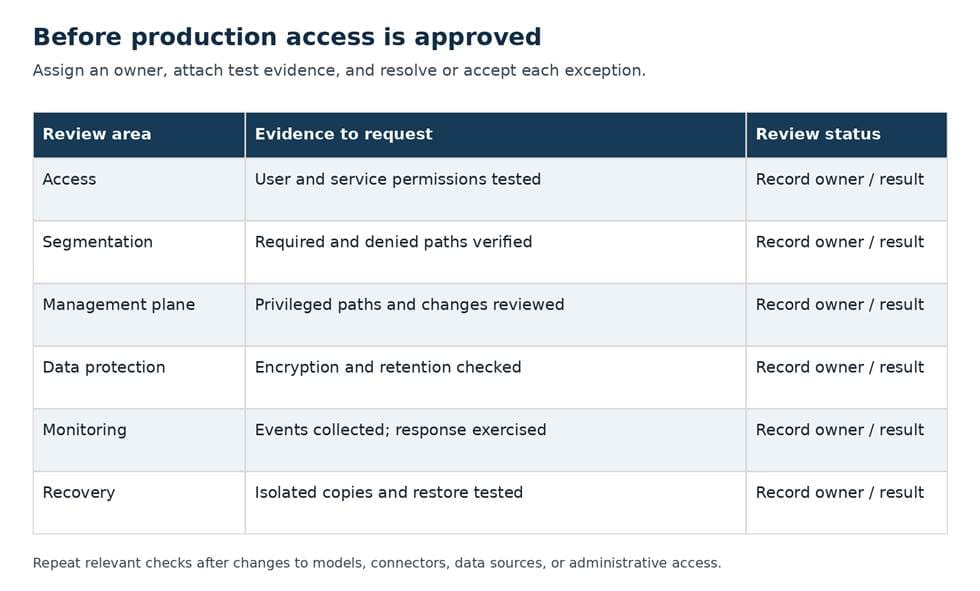
Pre-production review. Record owners, test evidence, and unresolved exceptions.
Include application tests for prompt injection and document permissions. Segmentation can limit the consequences of compromise, but it cannot establish that the assistant handles malicious instructions safely.
Our AI strategy and readiness work helps organizations clarify use cases, risks, dependencies, and operating responsibilities. Use that planning stage to assign security work before deadlines turn unresolved questions into production exceptions.
For any accepted exception, document the business reason, compensating controls, owner, and review date. Obtain approval from the person authorized to accept the risk. Repeat relevant checks when a model, connector, data source, or administrative path changes. Each can change what the application can access and how your team must protect it.
The executive review should leave clear answers to a few practical questions. Can the team show what the application can read and return to each user? Who has authority to change it or stop it? Has anyone restored the complete service and measured how long it takes? Those answers give leaders a firmer basis for approving deployment than a successful pilot alone.
Plan Security into Your AI Infrastructure
Netsync helps organizations plan AI infrastructure across compute, storage, networking, security, and operational requirements. Talk with our team about the controls and responsibilities your workloads need before production.
Frequently Asked Questions
How does AI workload security differ from model governance?
Workload security protects the systems, identities, data, and operations that run an AI application. Model governance addresses approved uses, evaluation, accountability, and oversight. They overlap when technical controls enforce governance decisions, such as allowing only approved models into production.
What should an AI infrastructure security review cover?
Review data flows, permissions, segmentation, management access, model and software sources, encryption, logging, response ownership, and recovery. Test the deployed controls and record the results.
How should teams segment AI workloads?
Separate user access, AI processing, data services, and management systems according to function and sensitivity. Permit required connections explicitly, enforce resource permissions, and review isolation wherever workloads share infrastructure.
Does running AI on premises keep sensitive data inside the organization?
Not automatically. Connectors, external services, telemetry, support access, and exports can move data outside the data center. Map those paths and test how the application actually behaves.


