Data Center Automation vs. Orchestration
A virtual machine can be created in minutes while the request to make it usable stays open for days. Someone still needs to confirm the network settings, apply the right configuration, enroll it in monitoring, and record who owns it. Automating the first task helps, but the handoffs may account for most of the delay.
That distinction should guide your data center automation priorities. Start by understanding where work slows down and which decisions still require judgment. Automate a well-defined task when that is the constraint. Use orchestration when the improvement depends on coordinating several tasks, systems, or teams.
For CTOs and operations leaders, the first project should produce a result the team can verify and maintain. A narrowly scoped workflow with clear ownership, tested recovery, and a useful baseline is a stronger starting point than an ambitious deployment that nobody can support when an exception occurs.
How do automation and orchestration differ?
Data center automation uses software to perform defined infrastructure tasks with reduced manual intervention. Data center orchestration coordinates tasks into a larger workflow, managing their sequence, conditions, and dependencies. The distinction concerns the scope of the work, not a competition between two approaches.
A configuration management job might check a server against an approved baseline and correct a permitted difference. An orchestrated workflow could validate a service request, obtain the necessary approval, prepare infrastructure, run configuration tasks, verify readiness, and update the request record. Individual tasks may themselves contain several technical steps.
A workflow can also pause for human review. Orchestration does not require every decision to happen without a person. It provides a way to coordinate the work, including conditions that determine whether execution continues, stops, or escalates.
Netsync’s automation and orchestration capabilities address infrastructure workflows and operational efficiency. When discussing a project, define its intended outcome in terms the receiving team can test. “Server created” and “server ready for the application team” describe different completion criteria and require different work.
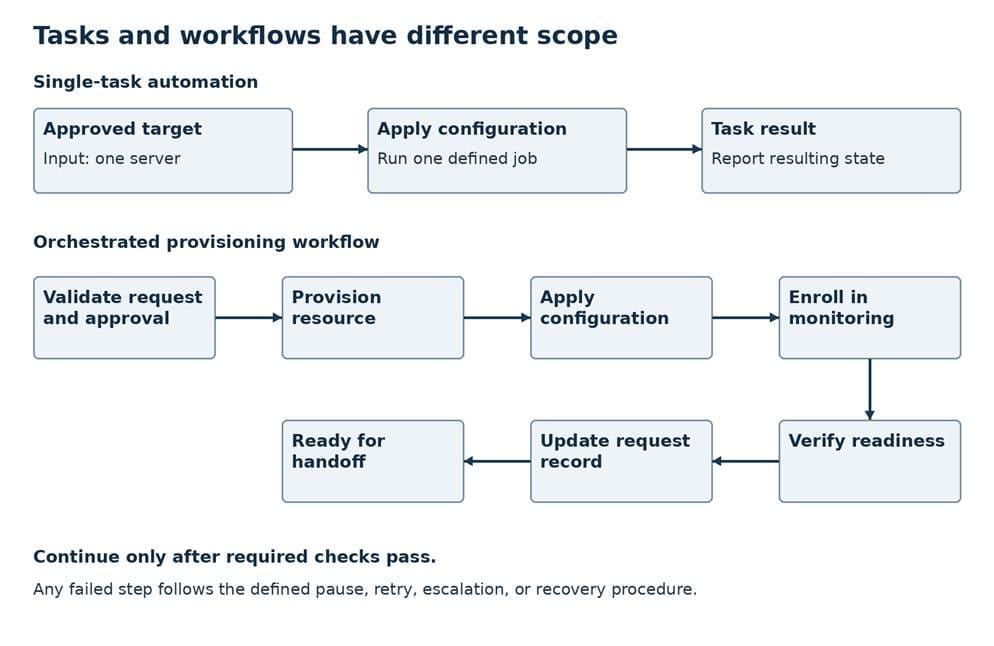
Illustrative process; validate the required checks and failure paths.
Identify repeatable workflows worth improving
Start with recent requests and change records. Find work that recurs often enough to justify maintenance and that follows a reasonably stable pattern. Provisioning, configuration checks, inventory collection, and routine validation can be candidates, depending on the environment and the consequences of an incorrect action.
Walk through a completed example with the people who performed it. Record hands-on effort separately from waiting time. A task that takes an engineer 20 minutes may wait two days for missing information. Automating execution will have limited effect if the request still arrives without an application owner or a required network designation.
Look for variation before encoding the process. If engineers handle the same request differently, determine whether those differences serve a legitimate requirement or reflect undocumented habits. Standardize the parts that should be consistent and document the exceptions that must remain.
Identify the source of authoritative information. An automation job that selects targets from an outdated inventory can apply a correct change to the wrong systems. Agree on which record defines ownership, environment, and approved configuration, and how the workflow checks that information before acting.
Include downstream teams in the discussion. The operations team may consider a resource deployed while security is waiting for a required control or application support cannot find it in monitoring. Shared completion criteria prevent the workflow from moving unfinished work into someone else’s queue.
Choose the first automation use case
Choose a project with clear inputs, a visible result, and a limited impact if it behaves unexpectedly. A read-only inventory or configuration report can help a team validate access and data quality before permitting automated changes. It is still worth checking whether the report supports a decision anyone actually makes.
For a first project that changes infrastructure, define the eligible systems precisely. One supported template in a development environment may be more manageable than every server across multiple platforms. Specify what the automation may alter and what it must leave for a separate approved process.
Evaluate each candidate against a few practical questions:
- Does it occur frequently, and is the manual effort documented?
- Are inputs, prerequisites, and completion criteria clear?
- Can the team test both expected behavior and failure conditions?
- Can it contain the impact of a mistake and restore a safe state?
- Is someone responsible for maintaining the workflow and its integrations?
A rare but highly consequential change may deserve automation eventually, yet make a difficult first pilot. A repetitive task with many unresolved exceptions may need process redesign first. Select the project whose uncertainty the team can reduce within a realistic scope.
Write a short pilot agreement covering eligible targets, owners, success measures, stop conditions, and the fallback procedure. Decide how many representative runs and which exceptions the team needs to observe before expanding access. The evidence required should reflect the risk, rather than a universal number of successful runs.
Design approvals, access, and rollback
Automation executes with the authority you give it. Use a dedicated service identity with access limited to the actions and resources in scope. Protect credentials outside workflow code, control who can invoke the job, and review permissions when the workflow changes. A useful script does not need broad administrative rights by default.
Define what happens after a partial failure. If provisioning succeeds but monitoring enrollment fails, the workflow should preserve the resource identifier and report the incomplete state. It may need to retry enrollment, pause for investigation, or remove the newly created resource under an approved rule. Decide which behavior is safe for that use case.
Make retries deliberate. An application programming interface request can time out after the destination has already performed the action. Before repeating it, check the resulting state or use a supported mechanism that prevents duplicate execution. Otherwise, a retry intended to recover from a communication problem can create a second resource or repeat an unintended change.
Human review and exception handling
Approval workflows should reflect the consequence of the action. A well-tested standard change may qualify for preapproval under organizational policy. A workflow that changes a production access rule or affects a sensitive application may require explicit review before execution.
NIST’s Guide for Security-Focused Configuration Management of Information Systems addresses change approval, access restrictions, testing, and rollback procedures. It also notes that preapproved changes still require testing and documentation. Treat approval as a defined control tied to the specific proposed action, including its targets and relevant configuration version.
Give reviewers enough context to decide. Show the requested change, affected systems, validation results, and expected service impact. If those details change after approval, determine whether the existing approval remains valid. Include an exception path for missing data, unsupported configurations, and requests outside the agreed scope.
Testing and change records
Test in an environment representative of the conditions the workflow will encounter. Include denied access, missing prerequisites, timeouts, and partial completion. Verify that stopping execution prevents additional work and leaves enough information for an operator to understand what already happened.
Rollback needs its own design and test. Restoring a previous configuration can be appropriate for some changes. Other actions, such as deleting data or altering a schema, may require a different recovery method and additional safeguards. Do not describe a workflow as reversible until the team has established what recovery actually involves.
Maintain audit trails that connect the request, approval, workflow version, executing identity, targets, and outcomes. Record failures and manual interventions as well as successful runs. Avoid exposing passwords or other secrets in those records. The operator investigating a failed run should not have to reconstruct the event from separate consoles and someone’s memory.
Measure operational value and reliability
Define the baseline before the pilot. Track elapsed time from an agreed starting point to a verified result, manual effort per run, failures, and rework. Use the same definitions before and after the change. Execution time alone can look impressive while approval delays or manual cleanup remain unchanged.
DORA’s software delivery research measures change fail rate and deployment rework alongside delivery throughput. For infrastructure work, borrow the principle of measuring reliability together with speed, while defining measures appropriate to your workflow. A job error that an operator resolves before production changes is different from a change that disrupts the service.
For example, define workflow failure rate as failed runs divided by all runs. Define infrastructure change failure rate separately as implemented changes that require immediate corrective action divided by all implemented changes in scope. Keep the definitions and denominators visible so a retry does not silently inflate the reported success count.
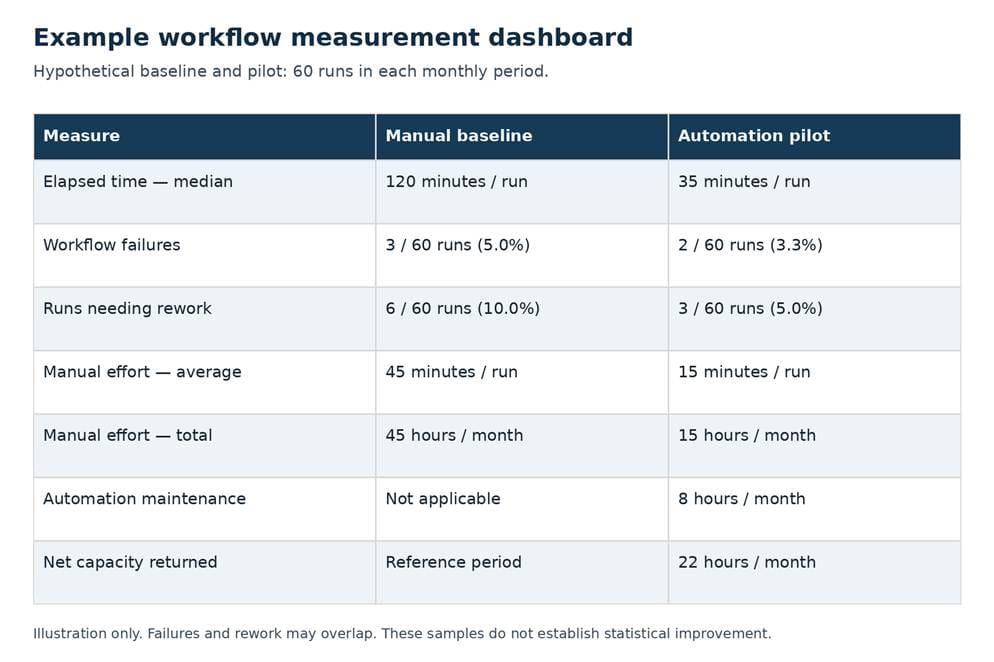
Illustrative dashboard; use consistent definitions and representative samples.
Operational ROI should include the cost of keeping automation useful. Consider development, testing, platform expenses, integrations, training, and ongoing support. Separate one-time implementation work from recurring costs and use actual run volume when estimating value.
Suppose a hypothetical workflow runs 60 times per month and average manual effort falls from 45 to 15 minutes per run. That returns 30 hours of staff capacity each month. If maintaining the workflow takes eight hours monthly, the net capacity returned is 22 hours, before other costs. Those hours create value when the team can use them for needed work; they are not automatically payroll savings.
Review the less successful runs as closely as the averages. A small pilot can reveal a repeatable exception without establishing a reliable long-term failure rate. Keep elapsed time, failures, and rework together when deciding whether the workflow is ready for broader use. Faster delivery with growing cleanup effort warrants investigation before expansion.
Expand automation without expanding unmanaged risk
Once the pilot meets its requirements, expand one meaningful boundary at a time. You might add another approved template, another platform, or a production environment. Recheck permissions, failure handling, and support readiness for that change. A workflow tested against a small development fleet has not demonstrated safe behavior everywhere.
Keep shared components under version control and assign owners for reusable modules. Document what each module expects and returns so another team can use it without depending on undocumented assumptions. When a platform interface changes, the owning team should know which workflows need testing.
Connect the workflow to normal operations. Netsync’s network operations services provide centralized monitoring and management. Where internal teams and service providers share responsibilities, specify who receives automation failures, who can stop a job, and who owns recovery. Confirm those responsibilities in the agreed service scope.
Periodically retire workflows that no longer serve the environment. Remove unused credentials, update documentation, and reassess automation that generates frequent exceptions. An infrastructure automation strategy needs room for that maintenance work, alongside new projects.
The next project should follow the evidence from the first. If task execution is now dependable but cross-team handoffs still dominate delivery time, orchestration may address the remaining delay. If failures stem from incomplete inventory or inconsistent standards, resolve those foundations before connecting more systems to the workflow.
Discuss your infrastructure automation priorities
Netsync helps organizations evaluate and implement automation and orchestration workflows. Discuss your infrastructure automation priorities with our team to identify a practical starting point and the operating requirements that support it.
Frequently asked questions
What is the difference between automation and orchestration?
Automation performs defined tasks with reduced manual intervention. Orchestration coordinates tasks, dependencies, conditions, and handoffs into a larger workflow. An orchestrated process can include human approvals and exception handling alongside automated actions.
Which data center processes should be automated first?
Start with repeatable work that has clear inputs, stable requirements, measurable effort, and a manageable impact if something goes wrong. Inventory reporting, configuration checks, or narrowly scoped provisioning can be candidates. Confirm that the team can test, maintain, and support the selected workflow.
How do you measure automation ROI?
Compare the value of reduced manual effort and rework with implementation and ongoing operating costs. Measure elapsed delivery time and reliability as well. Distinguish staff capacity returned to other work from expenses the organization can actually eliminate, and include maintenance effort in the calculation.
Does orchestration eliminate the need for human approval?
No. A workflow can pause for authorized review, enforce preapproved change rules, or route exceptions to an operator. Define approval requirements according to organizational policy and the potential impact of the action.


