Campus Network Modernization Without Disruption
The network replacement may take place on a weekend, but its success will be decided well before the first cable moves. A missing dependency, an untested access rule, or a recovery plan that takes longer than the maintenance window can turn a routine refresh into a difficult Monday morning.
For IT leaders, the challenge is to improve capacity and security while keeping the organization working. That means protecting classroom instruction, business operations, research, and public services as the network changes around them.
Campus network modernization needs a plan that connects technical work to those priorities. Some changes will require planned interruptions. Leaders should expect a proposal that explains the impact, limits the scope of each rollout phase, and gives the team enough time to restore service if something goes wrong.
That approach applies across school districts, universities, enterprise office complexes, and public organizations. Their operating calendars differ, but each needs a network that people can depend on throughout the transition and after the project ends.
Build the campus network upgrade around service needs
A campus network connects users, devices, buildings, and shared services across a location or nearby locations. Modernization can involve wireless access, switching, backbone connections, security controls, and management tools. It does not necessarily mean replacing everything at once.
Equipment age and vendor support timelines matter, but the strongest business case explains what the current network can no longer do reliably. A classroom may struggle when every student joins an interactive session. An office floor may need more capacity for video meetings. Cameras and building systems may place new demands on network connections and power.
These problems can have different causes. Poor wireless performance does not automatically justify replacing every switch, and adding access points does not guarantee better capacity. The assessment should establish which constraints affect service and what investment will address them.
Our enterprise networking services include network design, deployment, and monitoring. We connect those decisions to the organization’s requirements so the project has a clear purpose beyond installing new equipment.
Require an assessment that explains the operational risks
Before approving a design, leadership needs a reliable picture of the existing environment. That includes performance during busy periods, equipment support status, recurring incidents, and the services that depend on the network. A campus-wide average can conceal the connection that struggles whenever a lecture hall fills or a department reaches its busiest hour.
Wireless coverage and capacity deserve separate attention. A device may receive a signal without getting the performance its application needs. Cisco’s WLAN site survey guidance distinguishes coverage and capacity considerations and emphasizes validation after deployment. The assessment should reflect the spaces people use and the devices they actually carry, rather than relying entirely on a predicted design.
The same review needs to identify less visible dependencies. Authentication, address assignment, name resolution, voice services, and application connections all help turn a physical connection into a usable service. Door controllers, cameras, research equipment, and building systems may also have requirements that complicate a migration.
Executives do not need an inventory of every connection in the project presentation. They do need to know which dependencies could interrupt operations, who owns them, and how the proposed design will preserve them. Undocumented exceptions should have an agreed approach before the rollout reaches the affected area.
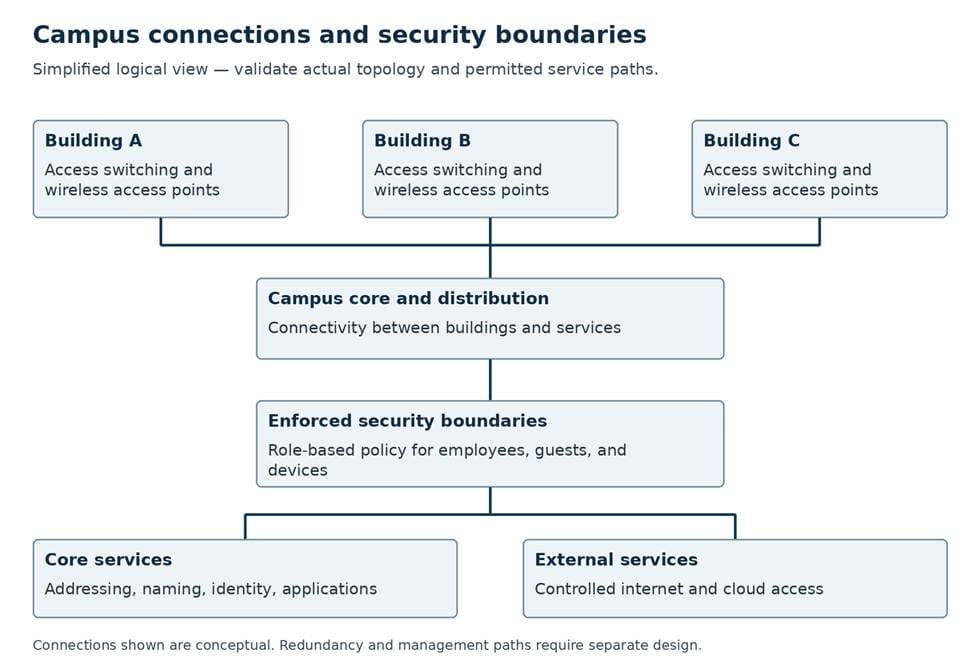
Conceptual campus view. Confirm the actual dependencies and access controls for each site.
Agree on performance and security outcomes before deployment
A requirement such as “improve wireless capacity” leaves too much open to interpretation. The team needs agreement on the activities the network must support, where they take place, and what acceptable performance looks like under expected demand.
For an education campus, that might mean reliable access to a learning platform in occupied classrooms. For an enterprise or public organization, the priority could be video calls, administrative applications, or services used at public counters. The specific tests will differ, but the acceptance criteria should reflect work people need to complete.
Capacity decisions also extend beyond wireless. New access points and connected devices can change switching, cabling, uplink, and Power over Ethernet requirements. The proposal should account for the complete path to shared services so an upgrade does not simply move the bottleneck elsewhere.
Security needs equally clear outcomes. Students, employees, guests, and facilities devices may require different access. Segmentation uses enforced traffic controls to limit communication; naming a network or assigning a device to a group does not, by itself, establish that the intended restrictions work.
Leadership should expect the team to verify both permitted and blocked access. The plan also needs a controlled way to address devices that require exceptions. Restoring service by granting broad access can undermine the protection the project was meant to provide.
Keep each rollout phase manageable
Phasing helps limit the impact of a problem, provided the sequence reflects shared dependencies. A building-by-building rollout can still affect the wider campus if it changes a common authentication service or network core. The plan should distinguish local changes from changes with broader consequences.
A representative pilot gives the organization a chance to learn before expanding. A quiet office with one device type may prove that installation works while revealing little about high-density classrooms or specialist systems. The pilot should reflect the next phase’s operating conditions, and the team should observe normal use before repeating the approach elsewhere.
The size of each phase should follow the team’s ability to test and recover. A larger maintenance window is not useful if the schedule leaves no time to investigate unexpected behavior or restore the previous service. Configuration checks, equipment preparation, and access to wiring closets belong before the cutover wherever possible.
Our project management team coordinates delivery activities and communication. For a campus upgrade, clear responsibilities and status reporting help connect engineering work with building access, equipment readiness, and decisions about whether a phase can proceed.
The roadmap below illustrates the decision points. Its “Requirements to proceed” column identifies what the team should demonstrate before moving to the next phase.
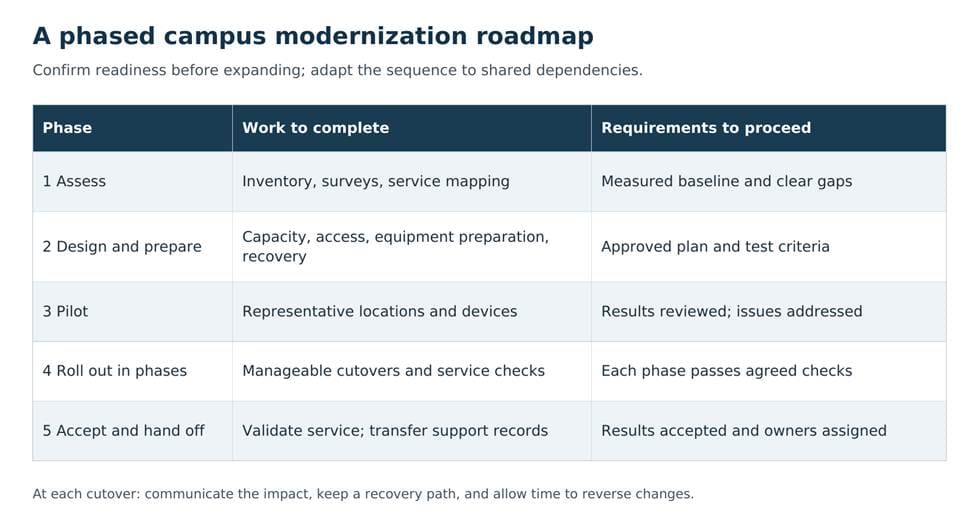
Illustrative roadmap. Confirm the requirements to proceed before expanding the rollout.
Plan interruptions around the organization’s calendar
Evenings, weekends, and summer breaks are not automatically quiet. Education campuses may have exams, registration, research, or other ongoing activities. Enterprises and public organizations may have extended service hours or functions that cannot pause with the rest of the site.
The migration plan should identify affected services, expected interruptions, and the people who need advance notice. That includes facilities and application owners, alongside users in the building receiving new equipment. Support staff need a clear explanation of what is changing and when the next update will arrive.
Every cutover also needs a recovery decision. Who can stop the work? What conditions trigger that decision? How long will restoration take? A rollback plan has limited value if the team waits until the end of the window to use it.
Some addressing, credential, or policy changes cannot be reversed with a simple cable swap. The project should identify those cases in advance and explain how service will recover. The executive concern is whether the plan leaves the organization with a workable response when the change does not perform as expected.
Accept a working service and fund its ongoing support
Successful installation is only one milestone. Acceptance should establish that people can use the applications and devices the network was designed to support, under representative conditions.
The checklist below illustrates the evidence leadership should expect from the technical team. It includes wired and wireless performance, access restrictions, movement between wireless coverage areas where relevant, and recovery from planned failure scenarios. A successful connection on an engineer’s laptop cannot establish that every supported device will behave the same way.
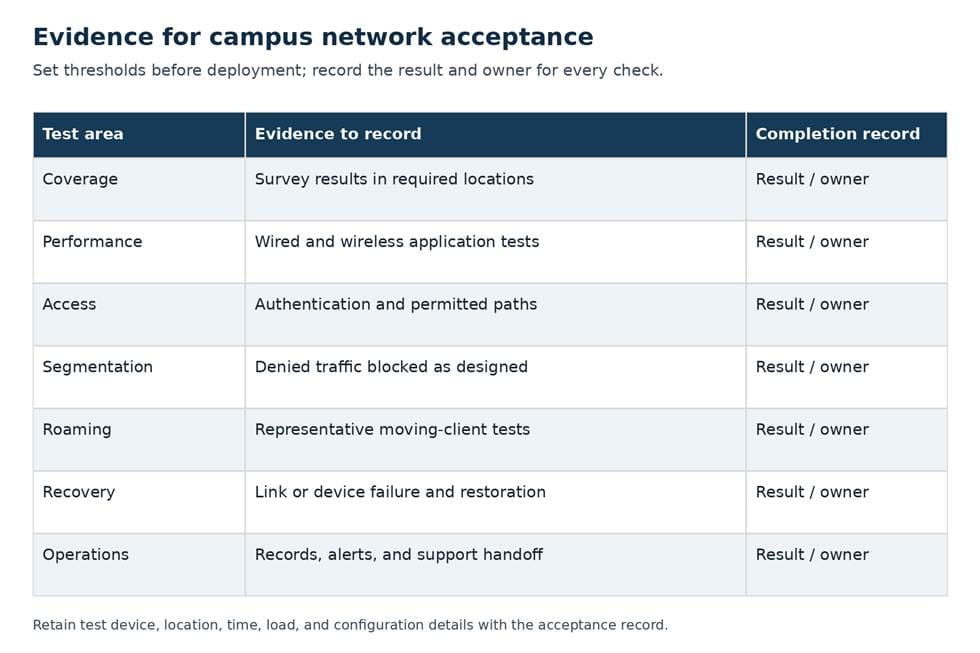
Illustrative acceptance checklist. Technical teams should document results against the approved requirements.
Unresolved problems need clear owners and decisions. Some may block acceptance; others may be suitable for later completion if the organization authorizes that approach. The distinction should be explicit before the project closes.
The support team also needs current diagrams, configuration records, support entitlements, access procedures, and known exceptions. Someone must own those records as the network changes. Monitoring should use the new performance baseline to help identify recurring issues and growing demand.
Finally, keep software maintenance, configuration backups, access reviews, and recovery exercises in the operating budget. A campus network transformation succeeds when the organization can support the resulting service, maintain its protections, and plan its next investment before capacity or vendor support becomes urgent.
Plan your campus network modernization with Netsync
We help organizations design, deploy, and monitor enterprise networks. Talk with our team about a phased modernization plan that aligns capacity, security, and service continuity with your campus requirements.
Frequently asked questions
Can a campus network be modernized in phases?
Yes. Teams can group work by building, function, or shared dependency. A phased plan should explain how existing and new equipment will work together, what the pilot must demonstrate, and when each phase is ready to proceed.
What should executives expect from a network assessment?
Expect a clear explanation of performance gaps, security needs, equipment support risks, and service dependencies. The findings should connect proposed investment with the organization’s operating requirements and priorities.
What should determine whether an upgrade is accepted?
Documented results should show that the network meets agreed service, performance, access, and recovery requirements. Acceptance also needs a clear decision on outstanding issues and a support team prepared to operate the environment.
Can modernization guarantee zero downtime?
No. Some changes require planned interruptions, and unexpected issues remain possible. Representative pilots, manageable rollout phases, tested recovery plans, and clear communication help limit the impact.


